Xero, a leading cloud accounting platform trusted by millions of businesses around the world continues to raise the bar for user experience and efficiency. Xero has begun rolling out a new navigation and homepage that are designed to make business finances simpler, faster, and more intuitive. With a refreshed interface, customizable widgets, and streamlined access to key financial information, this update helps business owners and accountants save time while gaining clearer insights. In this blog, we will explore what’s new in Xero’s latest design, and share insights from beta testers who have already experienced the upgrade.
Key Summary
Modern Interface
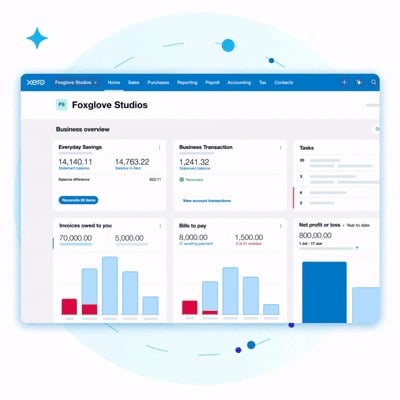
Xero’s new homepage is clean and easy to navigate. Key data is easier to find.
Customizable Widgets
Users can tailor dashboards to track cash flow, invoices, and KPIs. This saves time.
Simplified Navigation
Sales, Purchases, and Tax tools are front and centre. Fewer clicks are needed.
Beta Tester Feedback
Users report faster workflows, better tax visibility, and improved team productivity.
FastLane Support
FastLane Group helps Hong Kong businesses set up, customize, and train teams on Xero.
What’s New in Xero’s Homepage And Navigation
Xero’s new homepage and navigation are built around what users value most which is simplicity, speed, and personalization. Based on feedback from over 30,000 beta testers, Xero has refined to access insights better and perform daily accounting tasks without unnecessary clicks.
Modern, Cleaner Interface
The first thing users will notice is the sleek and contemporary design. The updated homepage offers a clean, uncluttered look that’s both visually appealing and functional. Key information is easier to locate, and the improved layout gives every widget and feature more breathing space. This ensures users can focus on their financial data without being overwhelmed by unnecessary details.
Customizable Widgets
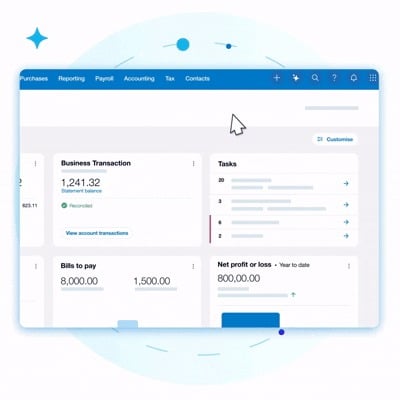
One of the most exciting upgrades is the ability to fully customize widgets on the homepage. Users can now tailor their dashboard to display the information most relevant to their business. This flexibility saves time, enhances workflow, and helps users monitor key performance areas with ease.
Simplified Navigation Structure
Navigating through Xero has never been easier. The new navigation bar has been reorganized to prioritise essential features such as Sales, Purchases, and Tax. This streamlined structure eliminates the need for multiple clicks to access commonly used tools. For accountants and business owners alike, it means faster access to reports, transactions, and compliance information.
Enhanced Visibility
Xero has also made it simpler to gain clear, instant insights into your business’s financial health. The redesigned layout improves how widgets display critical data such as cash flow, invoices, and tax summaries, ensuring users can make informed decisions at a glance. For instance, tax information now appears more prominently, giving advisors and SMEs immediate access to compliance-related details without navigating through complex menus.
Read: Guide to Xero’s Refreshed Navigation 2025
What Users Are Saying: Key Takeaways from Beta Testers
Xero’s latest update has been shaped by insights from over 30,000 beta testers, who provided valuable feedback on the new navigation and homepage. Their input has helped Xero refine the design, ensuring that the interface is not only modern and intuitive but also aligned with real-world business needs. Beta testers highlighted how customisable widgets and streamlined navigation have improved workflow efficiency, allowing them to access cash flow, invoices, and tax information faster.
1. Melissa Neighbour (Sky Planning, Sydney, Australia)
For Melissa Neighbour, Director and Principal Planner at Sky Planning, the refreshed interface has transformed how she manages her day-to-day operations. She praises the new modern, streamlined design and especially the customizable widgets, which let her display only the most relevant financial data.
Her favorite tools are the “Cash In and Out” widget and “Recent Invoices Paid” widget and they have helped her monitor daily cash flow and project payments instantly, without extra clicks or delays.
“Now it’s really quick – I can see everything at a glance, so it’s a lot more streamlined and which means we’re moving faster and getting projects completed more quickly.”
Melissa also noted how the customization saves her team time and reduces confusion, making the entire process of financial tracking more efficient and accessible.
2. Fabien Gendron (Reach CPA, British Columbia, Canada)
For Fabien Gendron, a business and tax advisor at Reach CPA, the standout improvement lies in the simplified navigation. The reorganized menu gives accountants and business users immediate access to their most-used tools — particularly tax features, which are now front and centre.
“Tax being front and centre on the navigation is great; previously I would have had to go through the reporting menu and start the reports I use the most. So to have all the tax info in one place is great.”
He also appreciates the spacious, clutter-free interface, which helps his team and clients focus on key information without distraction. For him, the update is not just about design, it’s about improving workflow and client productivity.
Read: Xero New Features And Updates 2025
How To Try The New Xero Experience
Xero makes it easy for users to try out the new navigation and homepage before the full rollout through an interactive prototype. This allows business owners and accountants to familiarize themselves with the redesigned interface, test features, and customize dashboards to suit their workflow.
Here’s a simple step-by-step guide to explore the new Xero experience:
- Visit the new Xero navigation page
Access the prototype directly from Xero’s official site to see the updated layout and navigation in action. - Try customising widgets
Adjust the dashboard to highlight the metrics that matter most to your business, such as cash flow, recent invoices, or expenses. Experiment with the placement and visibility of each widget to create a dashboard that fits your daily needs. - Provide feedback to Xero
Share your thoughts on what works well and where improvements could be made. Beta feedback helps Xero refine the platform, ensuring it continues to meet the needs of business owners and accounting professionals.
Read: A Guide To Xero For Small and Medium Businesses 2025
Conclusion
The new Xero design is a game-changer for SMEs and accountants. With enhanced visibility, streamlined workflows, and customizable dashboards, businesses can now access critical financial insights faster and make more informed decisions. Simplified navigation and front-and-centre tax tools reduce clicks and improve productivity, while personalized widgets keep the information that matters most right at your fingertips.
How FastLane Group Can Help
As a Xero Platinum Partner, FastLane Group supports businesses in leveraging Xero’s full potential. Our services include:
- Xero set up and customization – Tailor your dashboard and tools for maximum efficiency.
- Cloud accounting and financial reporting – Gain real-time insights and streamline reporting processes.
- Team training on Xero’s latest features – Ensure your staff can navigate, customize, and use the platform effectively.
Contact us today to optimize your business with Xero’s new experience.