




Xero has introduced a redesigned credit notes interface to align more closely with how invoices and quotes are created, making the system more intuitive and consistent for users. For Hong Kong SMEs and finance teams managing daily transactions, this update helps reduce the learning curve, streamline processes, and strengthen internal financial controls. By standardising layout, navigation, and functionality across documents, businesses can benefit from smoother workflows and improved audit trail protection. As a Xero setup and support specialist in Hong Kong, FastLane Group helps companies transition confidently to system updates while ensuring bookkeeping accuracy, compliance readiness, and operational efficiency.
Key Summary
Consistent Interface Design
Xero credit notes update aligns layout with invoices and quotes for smoother workflows.
Stronger Audit Trail Control
Paid credit notes are protected to enhance bookkeeping accuracy and audit readiness.
Updated Refund Workflow
Structured cash refund process improves financial control and reconciliation accuracy.
Productivity Enhancements
Improved navigation, error messages, and keyboard functions support faster data entry.
Smooth Transition for SMEs
With proper SOP updates and staff training, Hong Kong businesses can adopt the new interface confidently.
What Is Changing in Xero’s Credit Notes?
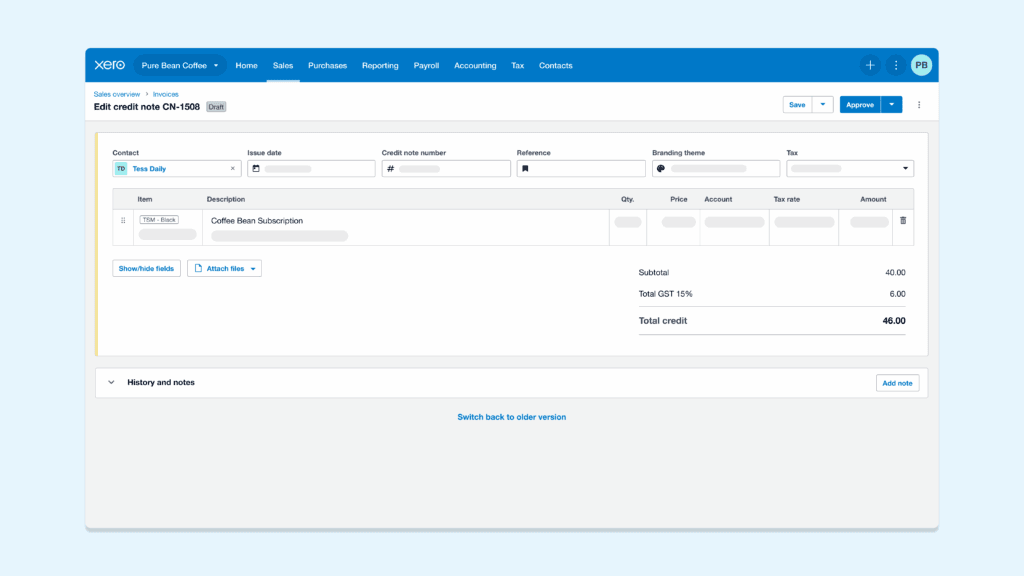
The new credit notes layout closely mirrors the structure and design of Xero invoices and quotes. This alignment ensures that users no longer need to adjust to a separate format when processing refunds or adjustments.
Key interface enhancements include:
- Consistent layout structure similar to invoicing and quoting screens
- Standardised button placement for actions such as approval, editing, and refunds
- Improved navigation flow, allowing users to move through fields more intuitively
By standardising how financial documents are created and managed, Xero reduces the learning curve for both new and existing users. This is particularly beneficial for Hong Kong SMEs where accounting teams often handle high transaction volumes and require efficient processing.
The rollout of the new credit notes interface is being conducted gradually. Xero has started releasing the updated version to selected users, allowing the platform to gather feedback and refine functionality before full implementation. This phased approach helps ensure system stability while incorporating real-world user insights.
Transition Timeline and Flexibility
Xero understands that businesses need time to adapt to system changes. During the transition period, users have flexibility in how they adopt the new interface.
Currently:
- Users can switch between the old and new versions using a toggle button at the top of the page
- Businesses can explore the new layout at their own pace
- Xero will provide advance notice before permanently retiring the legacy version
This dual-access period allows finance teams to update internal workflows, adjust standard operating procedures, and train staff without disrupting daily operations.
For businesses in Hong Kong preparing for audits or managing compliance deadlines, this transition flexibility is especially important. At FastLane Group, we recommend reviewing your credit note procedures early to ensure a smooth shift to the updated interface while maintaining accurate bookkeeping records.
Key Functional Changes Businesses Should Understand
While the new Xero credit notes interface improves consistency and usability, several functional updates directly impact how finance teams process adjustments and refunds. Understanding these changes is essential for maintaining accurate bookkeeping records and ensuring compliance readiness.
1. Paid Credit Notes Are Now Protected
Under the new version, paid credit notes can no longer be edited directly. This change is designed to safeguard the integrity of your financial records and strengthen internal controls.
If a modification is required, users must:
- Remove the associated payment or allocation
- Make the necessary amendments
- Re-apply the payment or allocation
This structured process ensures that historical transactions remain traceable and properly documented.
For Hong Kong businesses, maintaining a reliable audit trail is particularly important during statutory audits and profits tax filing preparation. Changes to paid transactions without proper documentation can create reconciliation discrepancies and raise compliance concerns.
By restricting direct edits, Xero supports stronger bookkeeping discipline, which aligns with best practices for audit preparation and financial reporting.
2. Manual Save Requirement
Unlike invoices, credit notes in the new version are not automatically saved. Users must manually click “Save” to preserve their entries.
This adjustment requires finance teams to adopt a slightly more deliberate workflow. While it may seem minor, failing to manually save can result in lost data or duplicated work.
To minimise disruption, businesses should:
- Update internal accounting procedures
- Remind team members of the manual save requirement
- Provide short refresher training during the transition phase
With proper process awareness, this change can be easily incorporated into daily operations.
3. Updated Cash Refund Process
The process for issuing refunds has also been updated.
To record a refund by cheque:
- Click the “Add Cash Refund” button located at the top of the credit note
- Process the cheque refund from the transaction document via the invoice list page
This structured approach ensures refunds are properly recorded and linked to the original credit note.
Companies in retail, e-commerce, and service industries frequently handle customer refunds. A clear and standardised refund process helps:
- Maintain accurate cash flow records
- Reduce reconciliation errors
- Improve documentation for internal review and audit purposes
By understanding these functional updates early, Hong Kong SMEs can maintain accurate books while adapting smoothly to Xero’s improved credit note system.
Upcoming Enhancements To Credit Notes
Xero’s redesign of credit notes is not just a visual update. It also lays the foundation for new tools that aim to improve speed, usability, and accuracy. These upcoming enhancements are designed to help finance teams work more efficiently while maintaining proper documentation and control.
1. Faster Cash Refund Processing
Xero is developing the ability to add cash refunds directly from the credit note itself. This enhancement will streamline the current workflow by reducing the number of steps required to process a refund.
Once available, this feature is expected to:
- Simplify refund handling within a single screen
- Reduce navigation between transaction pages
- Improve processing efficiency for high-volume businesses
For Hong Kong SMEs that regularly issue customer refunds, faster cash refund functionality can help improve operational efficiency while maintaining accurate financial records.
2. Time-Saving Data Entry Improvements
Another planned enhancement is the ability to add multiple new rows simultaneously when creating a credit note.
This improvement is particularly beneficial for businesses that:
- Process complex adjustments with multiple line items
- Manage inventory returns
- Handle bulk pricing corrections
By reducing repetitive manual entry, finance teams can complete credit notes more quickly and minimise data entry errors. Over time, even small efficiency gains can significantly improve overall accounting productivity.
3. Side-by-Side Email Preview
Xero is also introducing a side-by-side email preview feature. This allows users to see exactly how the credit note will appear to customers before sending it.
Key benefits include:
- Visual confirmation of document layout
- Opportunity to review details before dispatch
- Reduced risk of sending incomplete or incorrect information
For customer-facing businesses in Hong Kong, accurate documentation supports professionalism and strengthens client relationships. A clear preview function adds an extra layer of confidence before finalising and issuing credit notes.
Improvements That Enhance Accuracy and Control
Beyond layout changes, Xero has rebuilt credit notes to improve control, transparency, and usability. These enhancements support stronger bookkeeping practices and help businesses maintain reliable financial records. For Hong Kong companies preparing for audits or managing compliance requirements, these improvements contribute to better documentation and internal oversight.
More Detailed History Tracking
The updated credit notes now provide more detailed visibility within the History section, allowing users to clearly see what changes were made and when.
This includes:
- Clear records of edit actions
- Better tracking of document updates
- Improved visibility of transaction activity
Enhanced history tracking strengthens internal control processes by ensuring that any amendments are properly documented. This is particularly important during audit preparation, where accurate transaction trails help reduce queries and streamline review procedures.
For businesses working with external auditors or preparing financial statements, having transparent change logs supports accountability and improves confidence in the integrity of accounting records.
Clearer Error Messages
The new version introduces improved error messages, guiding users to complete required fields or correct issues before approval.
Benefits include:
- Faster approval of credit notes
- Reduced delays caused by missing information
- Fewer back-and-forth corrections within finance teams
Clearer prompts help minimize avoidable mistakes, especially when handling multiple transactions daily. By addressing issues at the point of entry, businesses can maintain smoother workflows and reduce time spent troubleshooting.
Improved Keyboard Navigation
Xero has also enhanced the keyboard experience to make data entry more efficient. Users can move through fields and line items more smoothly using tab functions and streamlined input controls.
This improvement supports:
- Faster entry of multiple line items
- Improved efficiency for high-volume accounting tasks
- Reduced reliance on repetitive mouse navigation
For SMEs and growing enterprises in Hong Kong managing large transaction volumes, even small improvements in data entry speed can enhance overall productivity. Efficient navigation also reduces user fatigue, contributing to more consistent and accurate bookkeeping practices.
Best Practices for Transitioning To the New Credit Notes Interface
Adopting Xero’s updated credit notes interface requires more than simply learning a new layout. To ensure accuracy, compliance readiness, and operational continuity, businesses should take a structured approach during the transition period.
Below are practical steps Hong Kong SMEs can implement to minimise disruption and maintain strong financial controls.
1. Review Internal SOPs for Refund and Allocation Procedures
With changes such as protected paid credit notes and updated refund workflows, it is important to revisit your existing standard operating procedures (SOPs).
Businesses should:
- Review how payments and allocations are handled
- Update documentation to reflect the requirement to remove and re-apply payments before editing
- Ensure refund approval processes remain clearly defined
Aligning internal procedures with the new system helps prevent processing errors and maintains a consistent audit trail.
2. Train Accounting Staff on the Manual Saving Requirement
The new version does not automatically save credit notes. Finance teams must manually click “Save” before exiting the page.
To reduce operational risks:
- Conduct short refresher training sessions
- Include the manual save step in internal checklists
- Encourage staff to double-check document status before closing
Proactive communication ensures team members adapt quickly and reduces the likelihood of lost entries or duplicated work.
3. Monitor Protected Paid Credit Note Handling
Since paid credit notes cannot be edited directly, businesses should monitor how adjustments are processed.
Best practices include:
- Assigning responsible personnel to handle payment removals and reapplications
- Reviewing credit note amendments regularly
- Ensuring documentation clearly explains any changes made
This structured oversight supports stronger bookkeeping discipline and enhances transparency during audits or financial reviews.
4. Test the New Interface Before the Legacy Version Is Retired
During the transition phase, Xero allows users to switch between the old and new versions. Businesses should take advantage of this flexibility to test workflows in advance.
Recommended actions:
- Create sample credit notes in the new interface
- Simulate refund and allocation scenarios
- Identify potential workflow adjustments early
Testing helps finance teams build familiarity and ensures readiness before the legacy version is permanently removed.
5. Ensure Proper Bookkeeping Records Remain Consistent
System updates should not affect the consistency of financial records. Businesses should confirm that:
- Chart of accounts mapping remains accurate
- Credit notes are properly allocated against invoices
- Refund transactions are correctly recorded
Maintaining consistency in bookkeeping records is essential for audit preparation, financial reporting, and profits tax compliance in Hong Kong.
Conclusion
The Xero credit notes update strengthens consistency, improves audit trail protection and enhances usability across invoicing workflows, allowing Hong Kong SMEs to manage adjustments and refunds with greater control and efficiency. With protected paid credit notes, clearer error prompts, improved navigation and upcoming productivity enhancements, businesses can streamline day-to-day bookkeeping while maintaining accurate financial records and compliance readiness. As system updates continue to evolve, having the right implementation approach is essential to ensure workflows, internal controls and reporting structures remain aligned.
At FastLane Group, we specialise in Xero implementation, optimisation and ongoing accounting compliance support for Hong Kong businesses. Our certified Xero advisor team ensures your Xero configuration, credit note processes and bookkeeping practices are properly structured to support audit preparation and profits tax compliance. If you are planning to transition to the new Xero credit notes, contact our team today to discuss how we can support your business.